Posted: 28th October, 2026
Every warehouse seems to have one: the aisle where scanners hang, the corner where pickers walk to the end of the row to get a transaction through. Dead zones are rarely bad luck. They have causes you can find and fixes that last, and most of them come down to how the network was designed for the building it sits in.
Published by Wi-Net Connect | Warehouse Wi-Fi Specialists
Technically reviewed by Simon McDonnell, Founder, Wi-Net Connect
Key takeaways
- A dead zone is not always “no signal”. Often the scanner can hear the network, but the network cannot hear the scanner.
- Racking, stock, where the access points are mounted, and the devices themselves cause most warehouse Wi-Fi dead zones.
- Find them by testing with your own devices where your team actually works, not by checking a dashboard.
- Turning up the power, adding Wi-Fi extenders or adding access points by guesswork usually makes things worse.
What a dead zone looks like on the floor
Warehouse Wi-Fi dead zones rarely show up as a clear “no signal” message. More often you hear things like:
- “It shows the full signal, but the scan just hangs.”
- “I have to walk to the end of the aisle to get it to go through.”
- “It is fine in the morning but terrible by the afternoon.”
- “My phone works there, but the scanner does not.”
- Forklift terminals dropping out in the same spots every day.
Each of these points to a slightly different cause, which is why it helps to note exactly what people are seeing.
Why dead zones happen in warehouses
Racking and stock block the signal
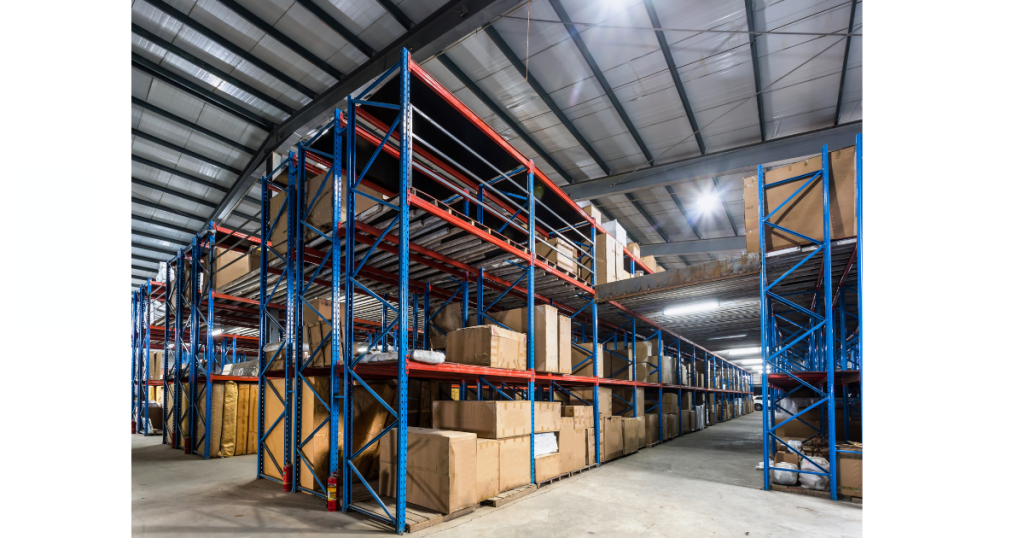
Metal racking bounces Wi-Fi around, and stock such as drinks, paper and tightly packed goods soaks it up. A deep aisle between two full runs of racking can be very hard for signals to reach. Because stock levels change, an aisle can work in a quiet month and fail in a busy one.
Access points mounted too high
Access points fixed to the roof cover the empty space above the racking well, but the signal has to push down through racking and stock to reach a scanner at waist height. Aiming the signal down the aisles, or mounting access points nearer the height people work at, usually fixes this.
The scanner can hear the network, but the network cannot hear the scanner
Wi-Fi is a two-way conversation. Access points are louder than handheld scanners, so a scanner can hear the access point clearly while its own replies never arrive. The screen shows full bars, but nothing gets through. This is the most common reason for “full signal, but it does not work”.
The scanner is holding on to the wrong access point
Sometimes there is good coverage, but the scanner is still connected to an access point further back instead of switching to the nearest one. The problem appears in the same place every time, but it is a handover problem rather than a coverage gap, and it is fixed in a different way. Our article on scanner connectivity problems covers this in more detail.
Too much interference
If too many access points share the same channel, or neighbouring networks are crowding the airwaves, the signal can be present but too noisy to use.
The building has changed
New racking, a mezzanine, a cold store or a reworked loading dock all change how signal travels. Cold stores are a common problem because their insulated walls block Wi-Fi very effectively. A network that worked when it was installed can develop dead zones without anyone touching it.
How to find dead zones
- Ask the people on the floor. Shift leaders and pickers know exactly where the problems are. Keep a simple log of the time, place, device and what the person was doing each time something fails.
- Walk the problem areas with your own devices. Use the scanners and terminals your team actually uses, at the height they hold or mount them, along the routes they follow.
- Get a survey. A professional Wi-Fi survey maps how strong and how clean the signal is across the building, and shows whether each problem area is a coverage gap, interference or a handover problem.
- Look at it from the device’s side. Dashboards show how the access points see the network. Monitoring such as Wi-Fi Assurance shows how your devices experience it, including where they drop out.
A green dashboard is not the same as a walk-through test
Access points can report healthy while scanners in an aisle struggle. If the dashboard and the floor disagree, believe the floor.
How to fix dead zones in warehouses
The right fix depends on the cause. From quickest to biggest:
| Fix | When it helps | Effort |
|---|---|---|
| Adjust access point settings | Interference, or scanners holding on to the wrong access point | Low |
| Tune how devices switch between access points | The “dead zone” is really a handover problem | Low to medium |
| Re-aim antennas or use ones that point down the aisles | Aisles poorly covered from roof-mounted access points | Medium |
| Move or lower access points | Signal aimed at the wrong height | Medium |
| Add an access point where a survey confirms a gap | Cold stores, mezzanines, loading docks | Medium |
| Redesign the network | Problems across the site, or the layout has changed a lot | High |
What not to do
- Do not just turn up the power. The scanner hears the network better, but the network still cannot hear the scanner.
- Avoid Wi-Fi extenders. They are designed for homes. In a warehouse, they slow things down and make handover between access points worse.
- Do not add access points by guesswork. Extra access points in the wrong places can interfere with each other and spread the problem.
When to bring in a specialist
If dead zones keep coming back, affect several areas, appear after a layout change or are stopping automated equipment, the cause is usually in the design rather than one faulty access point. That is why warehouse Wi-Fi needs to be designed around the racking, the stock and the device in the aisle. For an existing network, our Wi-Fi troubleshooting service finds the cause of each problem area before recommending any new hardware.
How we approach dead zones
We start with your log and your team, then walk the problem areas with your own devices before changing anything. Once we know whether each area is a coverage, interference or handover problem, we fix the cause and test the same routes again to prove it has gone. We are vendor-agnostic, so we work with the equipment you already have.
Frequently asked questions
Why does my scanner show full signal but still not work?
The signal bars show how well the scanner hears the network, not how well the network hears the scanner. Interference or a handover problem can also stop data getting through.
Will a Wi-Fi extender fix a dead zone in a warehouse?
Usually not. A properly placed access point, cabled back to the network, is the reliable fix.
Why do dead zones come and go?
Stock levels, open dock doors, vehicles and the number of devices in use all change how signal behaves through the day and the year.
About this guide
Written by Wi-Net Connect from how we survey, troubleshoot and test warehouse and distribution networks. Every site is different, so the right fix depends on your devices, layout and equipment.
Got an aisle that never works?
We will find out whether it is coverage, interference or roaming, fix the cause and prove it with your own devices on your own routes.
Call us: 02036 970426 | Email: info@wi-netconnect.co.uk